If you’re building your own Agent, how do you communicate with it? It seems like every framework has their own API or interface, and a standard protocol seems to be missing. I think A2A is the right tool for the job, especially when combined with a2ui
Every Agent framework I’ve tried has their own custom API, so there’s a bit of framework lock-in today when you integrate agents with a frontend. The closest thing we have to a “standard” agent API is the OpenAI “chat completions” API, which is limited by its text-focused approach, and lack of history and context.
What protocol might you use if you want a natively multimodal protocol that is broadly supported? A2A.
What is A2A#
The Agent-2-Agent protocol was released in 2025, when “multi-agent workflows” were on everyone’s mind. Here we are over a year later, and state of the art “multi-agent workflows” still take place on a single machine :sigh:.
While A2A continues to have low usage, many frameworks do have support, like the Microsoft Agent Framework, Google’s ADK, and Langchain / LangGraph. So building with A2A ensures we’re not locked into any specific Agent SDK, and won’t require reworking the frontend if we decide to switch.
The shape of the A2A API#
A2A’s API surface is relatively small, but carries with it some very powerful concepts. Some of my favorites are:
- Agent Cards allow agents to self-identify, and communicate what they are useful for.
- the
SendMessagecall can respond with either aMessagefor simple answers, or aTask, which continues to process after the intial response. - Messages can be multi-part, with different mime types, allowing for native multi-modal support
- Context and Task IDs join together related API calls, so related work can benefit from shared context.
- Artifacts represent durable outputs, rather than transient chat history. This separation makes it easier to stay on track and not re-litigate previous choices between human and agent.
That said, there are some sharp edges to look out for with a2a:
- No built-in authentication mechanism. This allows for any HTTP auth method, but be wary when demos and quickstarts omit auth.
- Once a task is considered “completed”, it cannot be continued. For work that requires reviews, this may mean (depending on agent behavior) that a single logical task reqires multiple Task IDs. Not necessarily a problem, as Context IDs do not complete and can be reused.
Overall, despite the gotchas, I’ve found A2A to be a very ergonomic way to communicate with agents. It has both the “streaming chat” workflow that’s popular these days, and the notion of long-running tasks.
A2A’s tooling gap, and A2Term#
Unfortunately, using A2A as your agent interface means that we lose the
convenience of “development UIs” like ADK’s webui.
When I started this work, I was using the official a2a CLI. This works perfectly fine for text, but it gets tiresome to look through big json blobs.
My next method was to use the Google Antigravity CLI. By talking to an
agent, with a more full-featured client, we can get a much better experience. I
told agy where the a2a endpoint was, and asked it to use the a2a cli, and it
figured out the rest.
When I started working with a2ui to have the agent generate
UI elements, I outgrew what agy could do for me, and had to move on to
something more like a custom UI.
That’s when I built a2term. a2term is a
terminal UI that supports chatting with agents over A2A, and also renders a2ui
elements in the terminal (as a separate tab).
Agent confirmation flows with a2ui#
A2term has changed the way I want to interact with my agents. It used to be a frustrating back and forth with revisions, or reading through what the agent says its going to do, and correcting it before it takes action.
Having A2UI elements allows the agent to prepare its actions, and I have a chance to review and modify them directly before they happen. For example, here’s a UI the agent constructed for editing the labels on a Github issue.
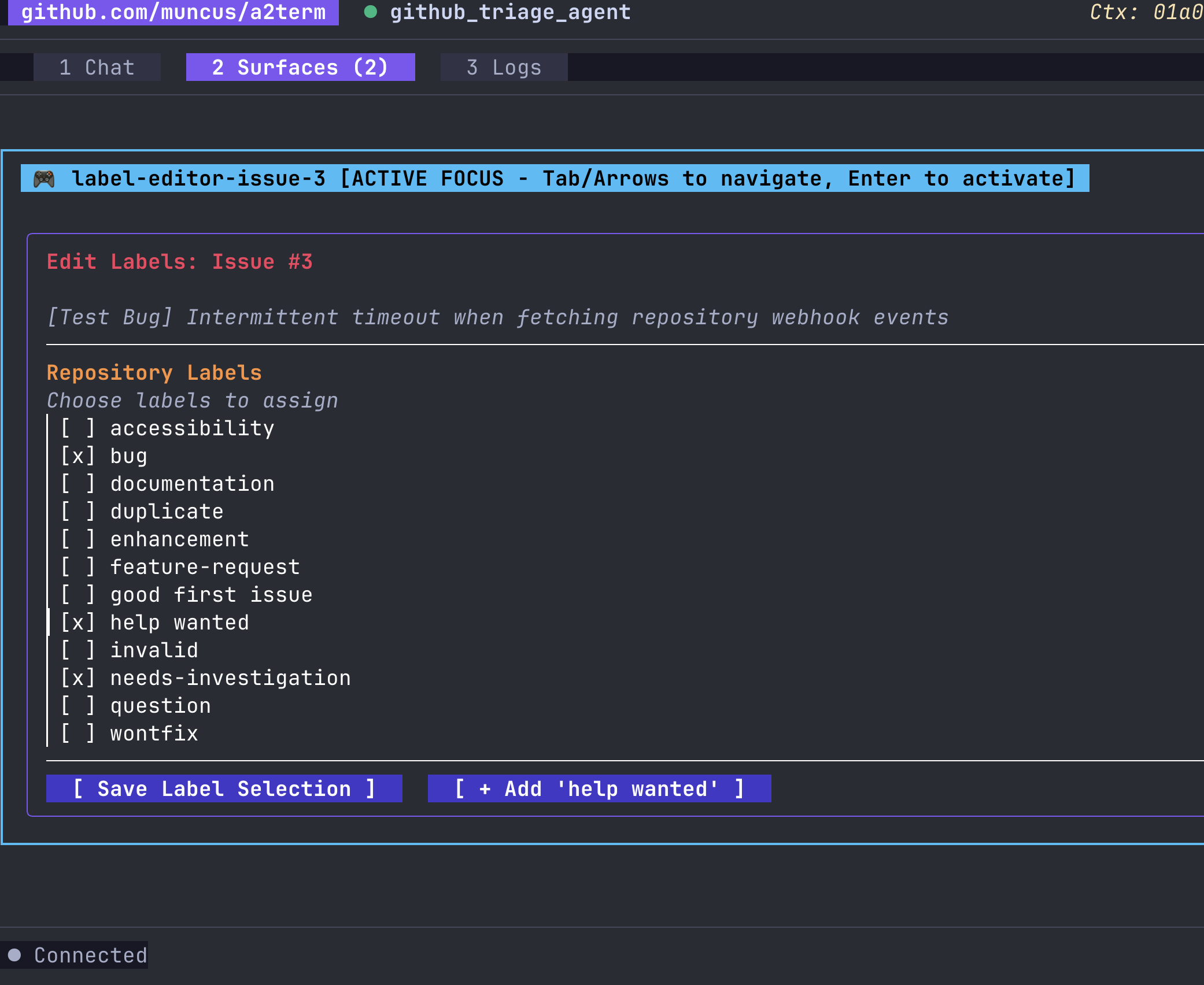
This UI surface was created entirely by the agent when I asked to “edit the labels on issue #3”.
I can now review changes in a simple UI, where every element is relevant and useful. This speeds up review compared to reading agent output markdown, or reviewing tool calling parameters.
Agents with A2UI just might be the antidote to enterprise software UI bloat!